Your kid's lunch, handled before coffee.
No more cash in backpacks or last-minute scrambles. Order the whole week for every child, from the vendors your school already approved.
Maya & Diego are fed Tuesday–Friday. We'll ring you if anything changes.
Phone, tablet or laptop
Order on the web, on your phone, or in the LunchBell app for iPhone and iPad. One account for the whole family, everywhere.
Load once, set auto-reload, and cover every kid. Clear balance, clear history.
Invite a co-parent or grandparent. Everyone sees who ordered what — no double-paying.
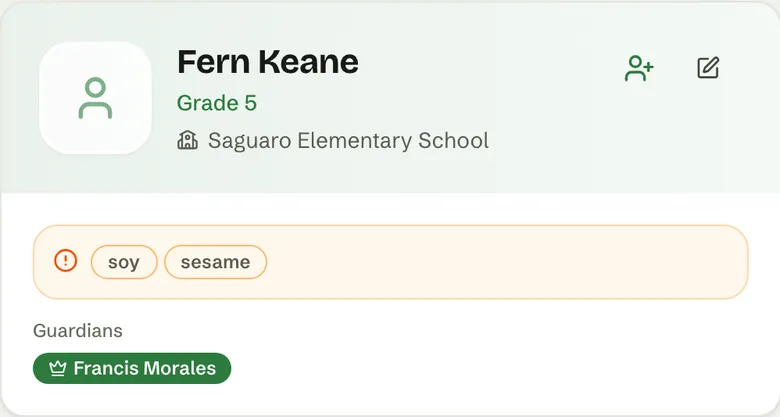
Their allergies follow them to every menu.
Flag each child's allergens once. Meals that contain them are marked on every menu.
Set it once at setup; it applies to every order from then on.
You only ever see vendors your school has vetted and approved.
Three steps. One quiet morning.
Add your students
Find your district, pick the school, add each child and their allergens.
Order the week
Tap through daily menus for every kid — or hit “repeat last week” and you're done.
They eat, you relax
Pay from your wallet. We handle the kitchen and the cafeteria.
Questions parents ask
Does it cost anything?
LunchBell adds a 12% platform fee to each order. No subscription. That fee is what keeps LunchBell free for your school and district.
What if my child has food allergies?
You set allergens for each child once during onboarding. From then on, any menu item containing a flagged allergen is visually marked before you can add it to the cart. Allergen information is provided by vendors and reflects the FDA Big 9 list. Always confirm with the vendor for severe allergies.
Can both parents manage orders?
Yes. Invite any guardian to your family. Everyone shares one wallet and sees the same orders, so nobody double-pays or double-orders.
When does LunchBell come to my school?
LunchBell goes live once your district approves the program. Join the waitlist and we'll email you when family sign-up opens.
Be first to know when LunchBell opens.
Join the waitlist and we'll email you when family sign-up opens.